Invoice and payment tracking almost never starts life as a software problem. Sales go well, the quote is accepted, the work gets done, the invoice goes out. Then one month cash gets tight and somebody asks the question: "How much are we owed?" The answer is assembled from three places (the bank statement, the invoice folder, somebody's memory) and comes out different every time. The cause is not laziness. Money is leaking quietly out of specific links in the chain that runs from a sale to a payment.
This guide follows that chain end to end, from the moment a quote is accepted to the moment cash lands. The scenario continues the one in our automated follow-up guide: the 24,000 EUR facade panel quote sent to Northgate Building Supplies has been accepted. (Demo data.) That is where the real work starts, because an accepted quote is not collected cash.
The five leaks in the chain
There are six links between a quote and your bank account, and the money does not disappear inside the links. It disappears in the gaps between them. The diagram below shows one month of leakage at an eleven-person wholesaler.
What the five have in common is that none of them is a mistake. Every one is a missing record. Nobody typed a wrong number; a step simply never got written down.
- 1. The quote was accepted, the order never opened. Approval usually arrives as one sentence in an email: "Looks good, go ahead." If that sentence does not become a record, the work sometimes starts and the invoice never does. The rule is simple: every approval, spoken or written, becomes an order record the same day.
- 2. The invoice went out with an untracked due date. The date is printed on the document and lives on no list. A due date only means something where something counts days for you.
- 3. The due date passed and nobody called. If the first week of a delay is silent, the customer starts deciding where you sit in their payment queue. No bad faith required: the supplier who follows up gets paid first.
- 4. A partial payment was never recorded. The customer sent 15,000 EUR against a 28,800 EUR invoice and nobody put it on the record. Two weeks later they are either treated as paid in full or chased as if they had paid nothing. The first costs money, the second costs the relationship.
- 5. Nobody knows who owes what at month end. The sum of the other four. Without one list there is no receivables management, only the receivables somebody remembers.
What to record at every link
You do not close these leaks with more discipline. You close them by deciding in advance what gets recorded at each step. The table below is the trail a job should leave on its way from accepted quote to collected cash.
| Link | Record | Fields that must be filled | Who, and when |
|---|---|---|---|
| 1. Quote | Opportunity + line items | Customer, named contact, line items (description, qty, unit price), validity period | The rep, the day the quote is sent |
| 2. Approval | Order | Order number, order date, the same line items, status | The rep, the day approval arrives |
| 3. Invoice | Invoice | Invoice number, issue date, due date, tax rate, grand total | Whoever invoices, on delivery |
| 4. Due date | The due date field on the invoice | A date, not a number of days; payment method and bank details | Automatic: issue date plus payment terms |
| 5. Reminder | Task + activity | Who called, what was said, the new date they promised | The account owner, on every contact |
| 6. Payment | Payment line | Amount, date, method, the invoice it belongs to | Finance, the day the money lands |
Row five is the one everyone skips. If the call is not written down, two weeks later the same customer is either called twice or not at all. "We will pay on the 20th" is not a promise, it is a date, and until it is on the record it does not exist.
Ageing: how late are we, at a glance
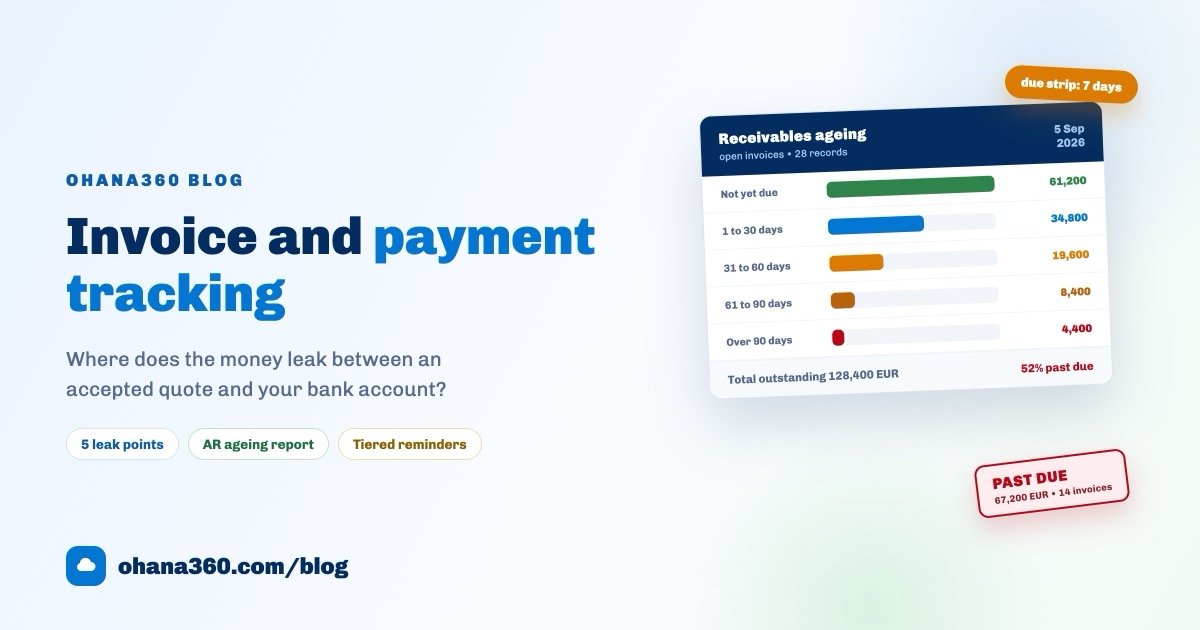
Receivables management has one foundational report and it is called ageing: it splits open invoices into buckets by how far past the due date they are. Your total may be 128,400 EUR. The question that matters is which bucket that total is sitting in.
Read it right to left, not left to right. Starting with the total is misleading because it is reassuring. Start with the rightmost bucket: anything past 90 days has stopped being a collections issue and become a decision. Here is what each bucket means and what it asks of you:
| Bucket | Amount (demo) | What it means | This week's action |
|---|---|---|---|
| Not yet due | 61,200 EUR / 14 invoices | Healthy receivables: work done, terms not up yet | Send a polite reminder three days before the date |
| 1 to 30 days | 34,800 EUR / 7 invoices | Mostly forgetfulness, not yet a problem | A short email or message with the invoice PDF attached |
| 31 to 60 days | 19,600 EUR / 4 invoices | Forgetfulness is off the table; there is a reason | Call, find the reason, get a payment date and record it |
| 61 to 90 days | 8,400 EUR / 2 invoices | Either a cash problem or a dispute | A formal written notice; discuss an instalment plan |
| Over 90 days | 4,400 EUR / 1 invoice | Very unlikely to collect itself | Decide: instalments, legal route, or write it down as doubtful |
Open the ageing report weekly, on the same day. The direction of travel matters as much as the number: if the 31 to 60 bucket grows two weeks running, the problem is not one customer, it is your reminder discipline.
The reminder discipline: from polite to formal
The tone of a collections conversation should be set by the number of days late, not by who happens to be sending it. The five tiers below make two different people say the same thing, which is what actually protects the relationship.
| When | Channel and tone | The substance | How it is built |
|---|---|---|---|
| 3 days before due | Email, polite | "A reminder that invoice INV-1058 is due on 12 October; the PDF is attached." | Scheduled flow: unpaid invoices due within the next 3 days |
| On the due date | Short message, informative | "If anything about today's invoice needs clarifying, we are here." | The due-date strip on the home page puts today at the top |
| Day 3 late | Phone, solution focused | Find the reason, agree a new date, write the date on the record | Ready-made flow template: a call task for the owner on overdue invoices |
| Day 15 late | Written, formal | Invoice number, amount, days late, payment request and a deadline | Your own flow: unpaid invoices older than 15 days |
| Day 30 late | A management decision | Pause new orders and shipments, agree instalments, or escalate | Your own flow: notify a manager on invoices older than 30 days |
Three rules keep this table standing. First, reminders must not depend on a person: nothing should stop when someone goes on holiday. Second, every contact goes on the record, so the second call starts from what was said on the first. Third, you should know before quoting a customer who already has an overdue invoice. The long version of making follow-up the system's job is in the automated reminders guide; for the document at the start of the chain, see how to write a business quote.
Partial payments and reconciliation
Back to Northgate Building Supplies: 24,000 EUR of line items, 28,800 EUR with 20% VAT, payable in 30 days. The customer sends 15,000 EUR. In a business without a recording habit that one transaction opens three different errors: it is treated as paid in full, it is chased as if nothing arrived, or the remaining balance is calculated wrong.
The correct handling is simple: every payment is recorded as a line attached to the invoice it paid. Amount, date and method go in; the remaining balance falls out of the total minus the payments. In this case the balance is 13,800 EUR and the invoice moves to partially paid. It looks like a small distinction, and the entire month-end answer to "who owes what" rests on it.
The monthly reconciliation is a five-minute job that looks at three numbers:
- Total invoiced this month. What did the business produce?
- Total collected this month. What came in? These two do not need to match, because collections include invoices from earlier months.
- The change in total outstanding since the start of the month. If it grew, either sales sped up or collections slowed down. The ageing report tells you which.
With larger customers, reconcile in writing twice a year: send your list of open invoices and compare it to theirs. Most disputes come not from bad faith but from two people looking at two different invoice numbers.
The e-invoice question, answered honestly
A boundary is worth drawing here, because this is where small businesses get confused most often. Ohana360 has no e-invoice or tax-authority integration. The invoice record in the system is a commercial tracking document: it carries the line items, the tax, the due date and the payments, it saves to PDF from the browser print dialog, and its footer says plainly that it does not replace a legally issued invoice.
In practice you run the commercial tracking and the collections discipline in the CRM, and issue the official document from your accounting setup. If you want both numbers on one record, add a custom field called "Official invoice no" to the invoice.
The first 7 days: a setup plan
The most common way this migration fails is trying to move every historical invoice at once. One hour a day for seven days is enough.
| Day | What to do | What you have at the end of it |
|---|---|---|
| 1 | Import customers and products from CSV; give products a code and a unit price | A catalogue you can build line-item quotes from |
| 2 | Enter open invoices only: number, customer, amount, issue date, due date | A real list of what you are owed (do not migrate closed invoices) |
| 3 | Add payment lines to the invoices that were partly paid | Correct remaining balances and a total you can trust |
| 4 | Set the default payment terms and tax rate, and the quote validity period | Every new invoice born under the same rule |
| 5 | Switch on the ready-made overdue flow template and rewrite the message in your own voice | The first reminder tier running by itself |
| 6 | Build three reports: invoice amount by status, open invoices by due date, invoiced amount by month | A dashboard worth opening once a week |
| 7 | Assign account owners and run a 30-minute rehearsal: quote to order, order to invoice, invoice to payment | A working chain and a team that knows it |
On day eight, every new invoice comes out of the system. Running both in parallel helps in week one and hurts in week two: nobody writes things down twice.
How the flow works in Ohana360
Finance360 owns the order, invoice and payment links of this chain; the quote lives on the opportunity record in Sales360. Here is what it does, without inflation, and what it does not do, without hiding it.
- The quote document: generated with Create Quote from the line items on an opportunity. It carries a quote number, the customer and contact, the quote date, validity (from the "Quote Validity (days)" setting in Setup), the preparer, the items, subtotal, VAT and grand total. Print / PDF saves it for sending. Note: a quote is not stored as a separate record; it is the opportunity's document.
- Orders: in the New Order screen, "Fill from opportunity" pulls a won opportunity and its line items in automatically. The order keeps a number, a date and a status (Draft, Approved, Invoiced, Cancelled).
- Invoicing: the Invoice button on the order list opens a modal that asks two things only, payment terms in days and the tax rate. Subtotal, tax, grand total and the calculated due date appear instantly. The invoice number and the line items carry over from the order.
- Due dates and statuses: invoice statuses are Draft, Sent, Partial, Paid and Cancelled. An invoice past its due date with a balance left is shown as Overdue automatically, with the number of days late next to the due date.
- Add Payment: amount, method (bank transfer, card, cash, cheque) and date. The remaining balance is recalculated at once; while a balance remains the status is Partial, and it becomes Paid at zero. Every payment is also listed on the Payments tab with date, invoice, customer, method and amount.
- The home page: two blocks. The due-date strip lists invoices falling due in the next 7 days, flagging today and anything already late. The Invoices needing attention list ranks open invoices by reason: days overdue, days until the due date, or a large remaining balance.
- Printable invoice: a clean document with your logo and company details, a payment breakdown, the remaining balance and a footer stating that it is for information and does not replace a legally issued invoice.
- Not included: e-invoice or tax-authority integration, automatic bank statement matching, ledgers and customer account statements. Those stay where they are today.
Want to see the flow in 57 seconds?
Putting the reminders on rails
The flow engine ships with one collections template: "Overdue invoices to a collection task". It is a scheduled flow, it runs at 09:00 every morning, its condition is "due date in the past and status is not Paid", and its actions open a call task due today for the record owner and send them a notification. It fires once per record, so the same invoice does not generate a new task every morning.
You build the remaining tiers yourself on the same screen. Date conditions in scheduled flows offer three options: "in the past", "within the next X days" and "older than X days". The polite pre-due reminder uses the second (next 3 days); the 15 and 30 day tiers use the third.
Which reports to build
Two finance reports come ready in the report list: "Invoice amount by status" and "Order amount by status". You build the rest in the report builder, drop them on a dashboard and add an email subscription. The reportable fields on the invoice object are: number, status, amount, VAT, issue date and due date. Date fields group by day, week, calendar month, quarter and year.
| # | Report | Object | Group by | Measure / filter |
|---|---|---|---|---|
| 1 | Invoice amount by status | Invoices | Status | Sum of amount (ready-made) |
| 2 | Invoiced amount by month | Invoices | Issue date (calendar month) | Sum of amount |
| 3 | Open invoices by due date | Invoices | Due date (week) | Sum of amount, filter: Status ≠ Paid |
| 4 | Past due invoices | Invoices | Due date (calendar month) | Sum of amount, filter: Due < today, Status ≠ Paid |
| 5 | Invoice count by month | Invoices | Issue date (calendar month) | Record count |
| 6 | Order amount by status | Orders | Status | Sum of amount (ready-made) |
| 7 | Orders waiting to be invoiced | Orders | Owner | Sum of amount, filter: Status = Approved |
| 8 | Pipeline by stage | Opportunities | Stage | Sum of amount (ready-made) |
One honest boundary: the remaining balance is not a field in the report builder, it is a calculated value. You see it on the invoice list and on the invoice record; the ageing buckets come from sorting that list by due date, or from exporting it and splitting it in a spreadsheet. The figure you report on is the invoice total.
If your customer records still live in spreadsheets, start the migration there: the Excel customer tracking guide includes a template and a migration order. If sales are moving into the same place, the sales tracking software guide is a good starting point. Current numbers are on the pricing page, and you can request a demo to try it with your own data.
Frequently asked questions
What does invoice and payment tracking software actually do?
Is accounts receivable tracking the same as bookkeeping?
In what order should I chase an overdue invoice?
Does Ohana360 issue legally valid electronic invoices?
How do I record a partial payment, and is the balance calculated for me?
Put every receivable on one list
Quote, order, invoice, due date and payment on the same customer record. Overdue invoices flag themselves, and the reminder comes from the system instead of from you.