Most teams start choosing sales tracking software by putting feature lists side by side and picking the longest one. Three months later nobody opens the tool. A better method is to decide what your team will genuinely use, reduce that to a short list of criteria, and then test every candidate on exactly those points. This guide gives you seven of them, each with two answers: why it matters, and how to test it before you pay.
The order below is a rough priority order, not a law: a two person team and a ten person team weigh these differently. If you are still deciding whether you need a tool at all, start with where spreadsheet customer tracking breaks down instead.
Before the criteria: what problem are you solving?
The most expensive mistake in a demo call is following the features the vendor wants to show. Bring your own list; these three answers decide which criteria carry the most weight for you:
- How many people will use it? One person, three reps in the field, or sales plus finance? Headcount drives both the concurrency requirement and the invoice.
- Where are you losing deals? Forgotten leads, quotes nobody chased, or invoices paid late? That is the part the tool actually has to fix.
- Where does the data live today? A spreadsheet, a notebook, a phone contact list, a chat thread? The messier the source, the more import quality and field structure matter.
The seven criteria at a glance
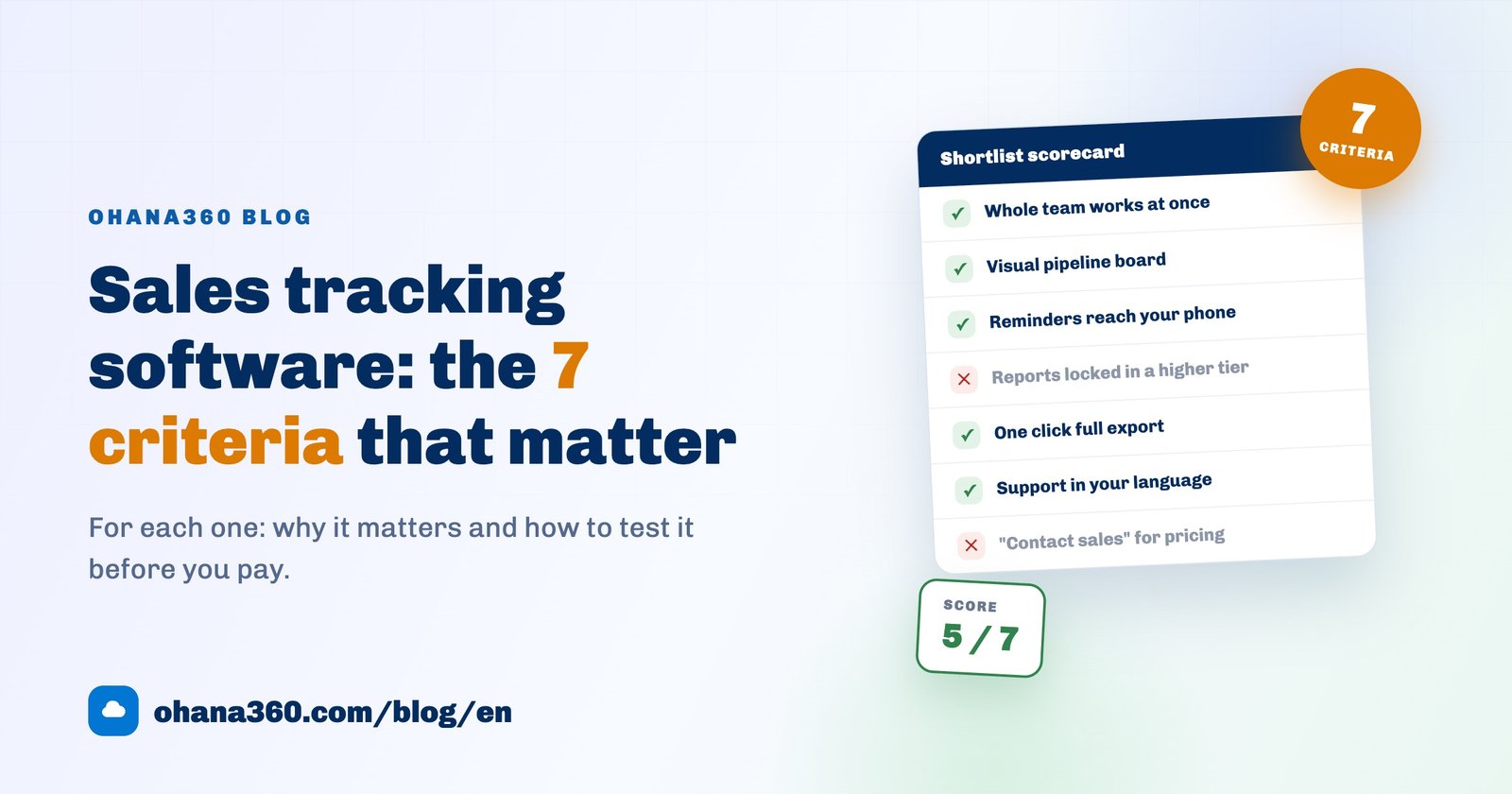
Print the scorecard below or keep it open while you evaluate. Score every candidate on the same seven headings, one point each, and three tools can be compared in an afternoon.
1. Concurrent access: what happens when the second person joins?
This is the number one reason teams leave spreadsheets behind. Two people editing the same file means overwritten rows, locked documents and duplicate copies. Real sales tracking software lets everyone open the same record at once, shows changes immediately, and records who changed what.
How to test it: Create two users in the trial, open the same deal in two browsers, change the amount in one and refresh the other. If the new value appears, that is a pass. Check visibility rules while you are there: if a rep should only see their own accounts, is that configurable?
2. A visual pipeline board: where are deals stuck?
List views are for data entry; decisions need a board. On a kanban pipeline you see at a glance how many deals and how much value sit in each stage. If eight deals have been parked in Proposal for two weeks, you notice that on a board, not in a table.
How to test it: Enter three or four sample deals and drag one into the next stage. Do stage headers show totals? Can you rename stages to match your own process? If the built in stages do not look like your sales process and cannot be changed, your team will quietly stop using the board.
3. Reminders and mobile access: does the system nudge you?
Most lost deals are lost to silence, not to a competitor. The question is not "can I write a note" but "will the system push me at the right time". Tasks, due dates, an owner and a notification: you need all four. Mobile matters for the same reason, since a note taken after a visit is forgotten by the time anyone is back at a desk.
How to test it: Set a task for five minutes from now, install the mobile app and wait to see whether the notification actually arrives. Ask whether mobile costs extra: with some vendors the app sits in a higher tier.
4. Reporting and change history: can you read the data back?
Entering data is easy, reading it back is not. If you cannot answer "how many quotes did we send this month, how many closed, what is our average cycle time" in about a minute, you are working for the system rather than the other way around. Change history belongs here too: who lowered that price, and when a stage was rolled back.
How to test it: Build one report on trial data (deal count and value by stage), then change a field and open its history. Discovering after the demo that reporting lives in the enterprise plan is an expensive surprise, so ask on day one.
5. Data portability: is the exit door open?
This is the most skipped and most costly criterion on the list. Any tool can turn out to be the wrong fit; what matters is whether you can take your data with you that day. A healthy vendor hands you records, attachments and field structure in a standard format. "Open a support ticket to request an export" is a polite no.
How to test it: On the first day of the trial, enter a few records and hunt for the export button. Can you download everything in one click, do attachments come with it, or do you only get a contact list? In Ohana360 a full export (ZIP) ships with every package; we treat that as basic courtesy rather than a feature.
6. Support and localisation: who picks up when something breaks?
Nobody evaluates support while buying, and everybody deals with support afterwards. Interface language, support language and support hours shape daily life: not everyone on your team works comfortably in a second language, and a desk eight time zones away turns an urgent issue into a lost day. Invoice currency belongs here too.
How to test it: Write to support, not to sales. Ask a simple question on a Tuesday afternoon and note how long the answer takes, in which language, and whether it is a real reply or a template. Response time during a trial is the best case you will ever get as a customer.
7. Transparent pricing: what will you pay in three months?
When a product has no public price and asks you to contact sales, the number usually depends on negotiation and on how big your team looks. Where does the per user price land as headcount grows? Are onboarding and training billed separately? Is an annual commitment mandatory? Get the answers in writing. The hidden costs of free plans are covered separately in the free CRM software guide.
How to test it: Ask for your own scenario to be priced: three users today, six in six months, plus a second module. What is the annual total, in an email? When the price list is public you do this yourself in two minutes, which is the practical value of transparency.
Decision table: seven criteria, ten minute tests
Fill this in as you compare candidates. The red flag column lists the sentences worth writing down when you hear them in a demo.
| Criterion | Why it matters | 10 minute test | Red flag |
|---|---|---|---|
| 1. Concurrent access | Everything else depends on it once a second user joins | Open the same record in two browsers and edit | "We can discuss per user licensing later" |
| 2. Visual pipeline board | Shows where deals are stuck | Drag a deal into the next stage | Fixed stages that cannot be renamed |
| 3. Reminders and mobile | Moves follow-ups from memory into the system | Set a 5 minute task and wait for the push | Mobile app only in a higher tier |
| 4. Reporting and history | Without readback you are only doing data entry | Build a report, open one field history | Reports reserved for the enterprise plan |
| 5. Data portability | Decides the cost of a wrong decision | Download a full export archive | "Raise a ticket to request an export" |
| 6. Support and localisation | The only thing that counts on the day it breaks | Message support at 3pm on a Tuesday | Community forum only, large time gap |
| 7. Transparent pricing | Prevents budget surprises | Price 3 users and 6 users for a year | No price page, demo required first |
Where Ohana360 stands on these seven
Here is our own product scored against the same list, without polish:
- Concurrent access: the whole team works on the same record at the same time, with record and field level change history.
- Visual board: Sales360 covers the flow from lead capture to opportunity to a drag and drop kanban board, and a web-to-lead form pushes your website enquiries straight in.
- Reminders and mobile: tasks and reminders are built in, notifications reach your phone, and the iOS and Android apps are included in every package.
- Reporting and history: reports and record history are standard, not a separate tier.
- Data portability: full export (ZIP) in every package, available whenever you want it.
- Support and localisation: the interface ships in English and Turkish, and support answers directly.
- Transparent pricing: core apps are 150 EUR per month per organization, the price is fixed, and the list is public on the pricing page, with no "contact sales" wall.
The honest part: we do not offer messaging app, e-invoicing or social media API integrations. If quotes, orders and invoices are what you are shopping for, that work happens in Finance360: line item quotes, conversion to orders, printable PDF invoices and payment or due date tracking.
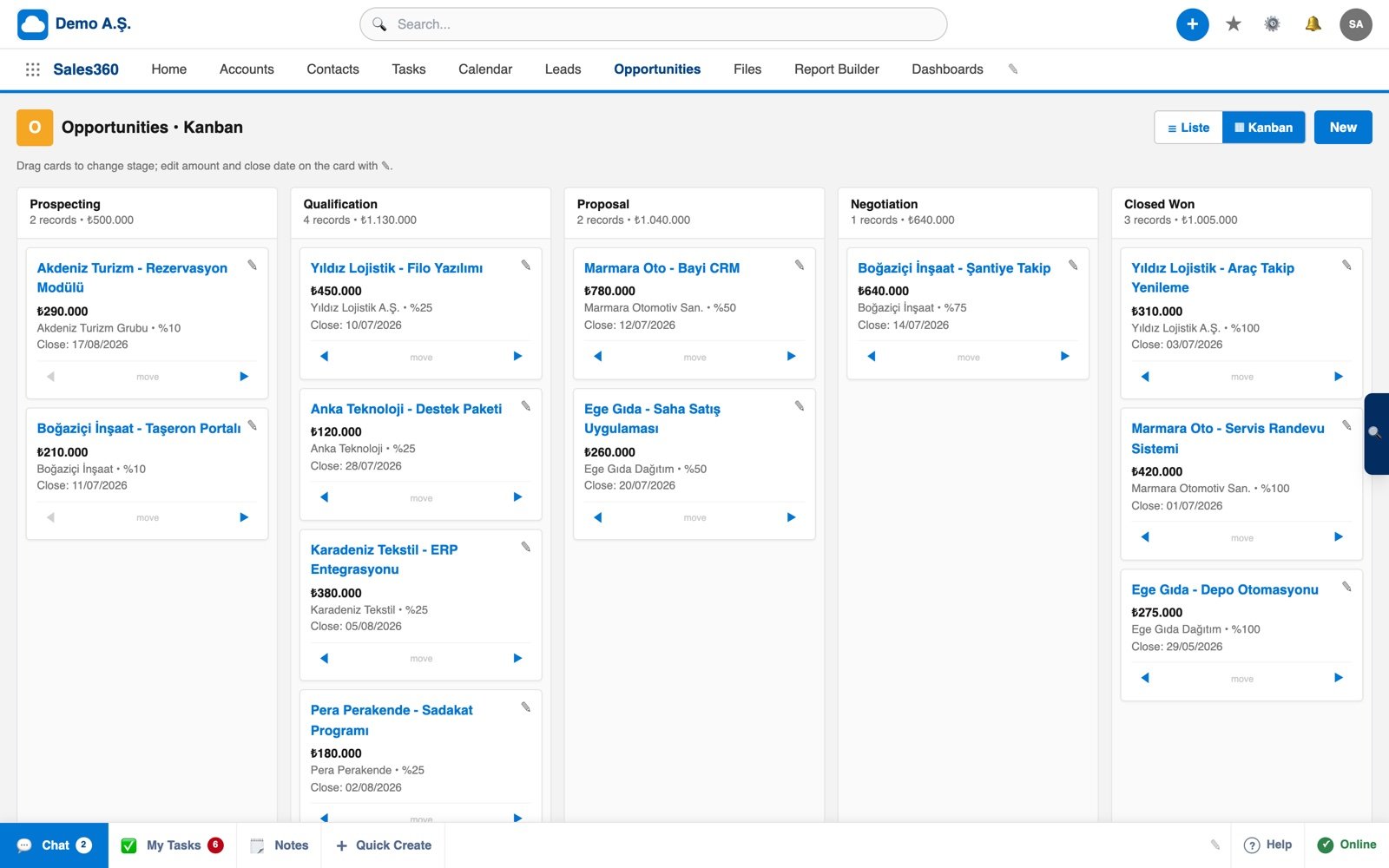
If you would rather see the board in motion, here is the 57 second tour:
A five day trial plan that does not go to waste
Most trials expire because someone signed up, clicked around for ten minutes and forgot. A small plan spread over five days turns the decision into evidence:
- Monday: Import 20 real records of your own. If the import fights you, that is already a result.
- Tuesday: Add a second user, restrict their permissions and try a simultaneous edit.
- Wednesday: Rename the stages to match your process, move five deals across the board, create two tasks and check the notifications on your phone.
- Thursday: Build one report, open a field history and ask support a real question.
- Friday: Download the full export, fill in the scorecard and request the annual cost for 3 and 6 users in writing.
By Friday evening you have two or three candidates scored on the same seven headings. The decision stops being a feeling and becomes a scorecard.
Frequently asked questions
What does sales tracking software actually do?
Do small teams really need sales tracking software?
Which criterion matters most when comparing tools?
How much does sales tracking software cost?
Can I get my data out if the tool turns out to be wrong?
Fill in the scorecard on Ohana360
Create your org for free, import your own records and test all seven criteria against real data. No credit card needed to set it up.