Most teams start looking for a Salesforce alternative for small business not because the product is bad. Salesforce largely defined the CRM category and, at the right scale, it is still the best thing on the market. The problem is usually narrower: an eight-person team pays the full price of a platform designed for teams of hundreds, while using a small corner of its surface.
This is a decision guide, not a competitor takedown. In order: the five situations where you should stay on Salesforce, why the bill grows on a small team, a three-year cost table built on stated assumptions, the concept map, what you lose and gain by moving, a five-step migration checklist, and a demo case with eight users.
Honesty first: 5 situations where you should stay
Opening an alternatives article with "stay" looks odd. But a bad migration costs more than an expensive licence: lost data, two months of confusion, and the price of moving back. If any one of these five describes you, our advice is simple: stay.
- Your business runs on custom code. If Apex triggers, Visualforce pages or custom Lightning components sit at the centre of your process, you cannot rebuild them one-to-one on a no-code platform. If an approximation is not good enough, stay.
- You depend on a specific AppExchange package. CPQ, field service scheduling, an industry accounting bridge: packages are the ecosystem's greatest strength. If one of them is the backbone of your operation, there is nothing to compare.
- Your processes are genuinely complex. Multi-level approval chains, territory management, involved revenue recognition rules, multi-currency consolidation: at that scale the depth is an advantage, and simplifying is a loss.
- Your team is large and still growing. Above a hundred users, with a dedicated admin and an internal training routine, per-user licensing already makes sense; administration cost shrinks as it is divided across users.
- You have many critical integrations. If your ERP, marketing automation, contact centre and warehouse have been wired together over years through ready-made connectors, rebuilding all of that easily exceeds the saving.
Why the bill grows on a small team
Enterprise CRM cost is not one line, it is three layers, and a small team feels each of them out of proportion:
- Per-user licences. On an eight-person team, every new hire is a fixed monthly cost. The warehouse lead who opens a few records a month carries the same licence as the rep who opens thirty a day.
- An admin or a consultant. This is the hidden line. Adding a field, fixing a flow or building a report means either someone's time or purchased hours. On a small team that cost cannot be divided across many users.
- Features nobody opens. Edition tiers arrive as a bundle. Territory management, advanced forecasting and complex approval chains are in the price whether or not you ever switch them on.
Comparisons that skip any of these three are misleading. We covered how the real cost of a CRM adds up more generally in the free CRM software guide, and that list of hidden costs applies here too.
Three-year total cost, as a table with variables
The table below is built on stated example assumptions and is not a price quote. We do not print a fixed figure for the enterprise side; put the values from your own contract in place of the variables. The scenario: an eight-user team, 36 months, the same job in both systems.
| Item | Formula | Example assumption | 36-month total |
|---|---|---|---|
| Enterprise CRM side (variables) | |||
| User licences | 8 users × L × 36 months | L = monthly price per user, example 80 EUR | 23,040 EUR |
| Add-ons and tier upgrades | A × 36 months | A = monthly add-on spend, example 100 EUR | 3,600 EUR |
| Implementation and migration | one-off I | I = implementation project, example 4,000 EUR | 4,000 EUR |
| Admin or consultant | C × 36 months | C = monthly admin support, example 400 EUR | 14,400 EUR |
| Example total | Change the assumptions and the total changes | 45,040 EUR | |
| Ohana360 side (list price) | |||
| Core app (Sales360) | 150 EUR × 36 months | Flat per app, per organization | 5,400 EUR |
| Extra users | 7 × 25 EUR × 36 months | The first user is included with the subscription | 6,300 EUR |
| Implementation and migration | CSV import | Field mapping, done by your own team | 0 EUR |
| Admin | internal user | A part-time user owns the configuration | 0 EUR |
| Example total | Premium Support is optional at 50 EUR a month | 11,700 EUR | |
The Ohana360 figures are the list prices from the pricing page: core apps 150 EUR a month, add-ons 50 EUR, industry editions 250 EUR, extra users 25 EUR. Prices are monthly and billed annually; they are fixed and do not change with campaigns. A second core app, Finance360 for instance, adds another 5,400 EUR over 36 months.
The concept map: what your vocabulary becomes
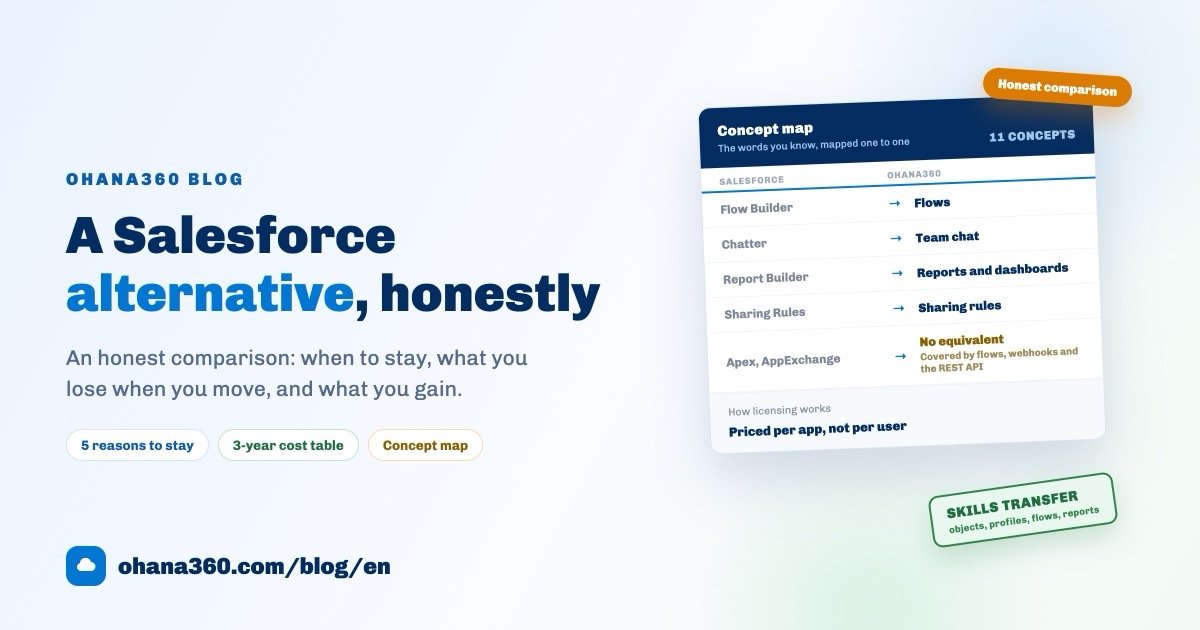
The fairest worry an experienced admin has is losing knowledge: you spent years learning objects, profiles, flows and reports. Ohana360 is built on the same concept set, so that knowledge transfers. The map below comes from the concept table on our switching from Salesforce page.
| In Salesforce | In Ohana360 | What changes |
|---|---|---|
| Objects, fields and records | Objects, fields and records | Accounts, contacts, leads, opportunities and cases keep their names and relationships, including the lead convert flow. Custom objects get their own tabs. |
| List views | List views | Filters, sorting, saved views, inline editing and per-user column preferences. |
| Profiles and permission sets | Profiles | Object-level and field-level access, login history and audit logs. Permission sets are not a separate concept; it all lives on the profile. |
| Flow Builder | Flows | Record-triggered, scheduled and screen flows with formulas, the changed operator, related-record updates, scheduled paths, run history and approval processes. No code. |
| Sharing rules and public groups | Sharing rules and public groups | Owner-based and criteria-based sharing, with View All and Modify All on profiles. |
| Chatter | Team chat and record feed | Channels, groups, direct messages, file sharing, and posts on every record. |
| Report Builder and dashboards | Reports and dashboards | A builder that thinks in objects and filters, with scheduled email subscriptions. |
| Page layouts and Lightning pages | Page layouts and record widgets | Arrange fields, related lists and widgets per object and per profile, from setup. |
| Web-to-Lead and Web-to-Case | Web-to-lead and web-to-case | The embed snippets you expect, creating records with attribution. |
| AppExchange | Marketplace | Industry apps enabled per organization at a flat price. A third-party package ecosystem at that scale does not exist here. |
| Salesforce Mobile | Ohana360 mobile apps | Native iOS and Android apps, included for every user. |
What you lose by moving
You will not find this section in a sales brochure, so here it is plainly. Moving to Ohana360 means leaving behind:
- Apex and custom code. You are choosing a no-code platform. Most of what triggers do can be rebuilt with flows, formulas and webhooks, but we cannot claim that anything is possible.
- The AppExchange ecosystem. Thousands of ready packages, a consulting network and integration depth are Salesforce's biggest advantage. What replaces it is a smaller marketplace of industry apps at a flat price per organization.
- The deepest enterprise features. Territory management, sophisticated forecasting models, the depth of industry clouds and mature AI capabilities are not here at that level.
- A large pool of certified specialists. Hiring a Salesforce admin is easy. On the new platform, that person is most likely someone already on your team.
- Years of accumulated integrations. You can rebuild them with the REST API and webhooks, but there is no install-and-connect button waiting for every system.
And what you gain
- Predictable cost. A flat price per app, with automation, API, mobile apps and the AI assistant included. The budget fits on one line.
- A working setup in minutes. Your own organization, subdomain and sample data, without an implementation project measured in months.
- Setup screens a part-time admin can own. The concepts are the same; the sprawl is gone.
- Mobile for everyone. The iOS and Android apps are included, not an upsell.
- Skills that transfer. Training the team is a walkthrough, not a course.
If automation is your main question, the automation page spells out exactly what the flow engine does and does not do: record-triggered, scheduled and screen flows, formulas, scheduled paths and webhook actions.
Migration: a 5-step checklist
What makes a migration hard is sequence, not technology. Teams that skip the inventory and start with the import come back in week two, because nobody remembers why a given field was moved.
Two columns matter more than the rest: opens in the last 90 days on the reports tab and last login on the users tab. Together they usually cut the migration workload in half. If twelve of forty-six reports move, the project gets shorter and the new system starts clean.
Demo case: Northline Logistics, 8 users
The example below is demo data, not a real customer; it exists to show how an inventory is read. Northline Logistics is an eight-person freight company that has used an enterprise CRM for four years: three in sales, two in operations, one in accounting, one in the warehouse, one managing director.
| What the inventory showed | Number | Decision |
|---|---|---|
| Standard and custom objects | 7 standard, 2 custom (Shipment, Vehicle) | All moved; Shipment limited to the last 12 months |
| Custom fields | 84 fields, 31 populated below 20% | 53 moved, 31 left behind |
| Reports | 46 reports, 12 opened in the last 90 days | 12 rebuilt, 6 of them became list views |
| Automations | 9 flows, 3 Apex triggers | 9 flows rebuilt one-to-one; 2 triggers became flows, 1 a webhook |
| Users | 11 licences, 8 logged in during the last 30 days | 8 users moved, 3 licences closed |
Timing: three days of inventory, half a day of exports, two days of import and rebuild, two weeks in parallel. The longest debate was about the Apex trigger that enforced credit limits. Instead of blocking the save, the team built a flow that flags the record and opens a task for accounting when the limit is exceeded. It is not the same behaviour, and they accepted that knowingly. That is what an honest migration looks like: every loss gets named.
After the switch, the sales side ran on a single board; a similar setup is described in our sales tracking software guide. For colleagues new to the vocabulary, what is CRM is a good starting point.
The switching page in Ohana360
The switching from Salesforce page exists for exactly this decision. It contains:
- The concept map: eleven Salesforce concepts and their Ohana360 equivalents, each explained.
- A side-by-side comparison: how the two differ on pricing, app structure, industry fit, administration, go-live and data ownership.
- A three-step migration path: export and import, rebuild the essentials, move the team, each with a realistic time estimate.
- Frequently asked questions: data migration, Apex and custom code, running in parallel, and who builds Ohana360.
The cheapest thing you can do before deciding is to run a pilot on the free trial: import one object from CSV, build two list views, write one flow. An afternoon is a reasonable price for testing a three-year decision.
Frequently asked questions
What should I look at first when comparing Salesforce alternatives?
Why does Salesforce get expensive for a small business?
Can I move my Salesforce data into Ohana360?
What happens to my Apex code and AppExchange packages?
Can I run both systems during the switch?
Try it with your own data
Import a CSV, build a flow, invite a colleague. The free trial is the whole platform, and no credit card is needed.