Most small businesses arrive at the idea of a customer satisfaction survey through one vague question: are our customers happy? That is the one question whose answer changes nothing. The questions that change something are narrower. How many of the people we served last month will call us again, what separates them from the ones who will not, and who is going to ring the person who scored us a 2 this week?
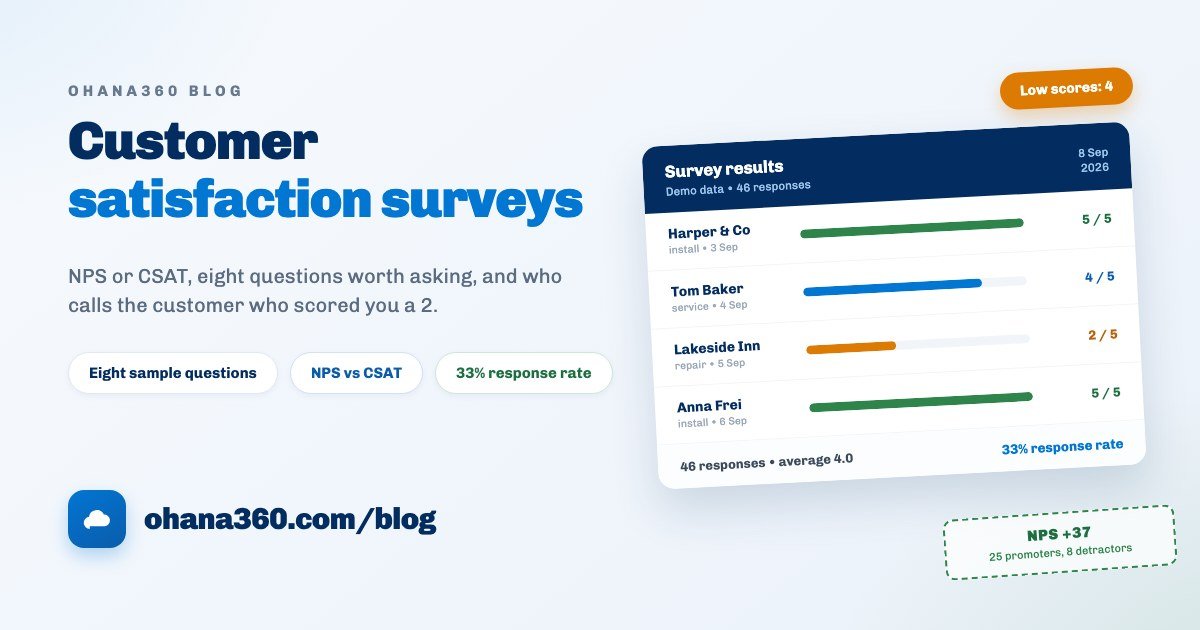
Our example is Marlow Blinds, a nine-person blinds and awning fitter. Their first attempt had 11 questions, went to 104 customers and came back with 19 answers. The second round had four questions, left the day after each install, went to 140 customers and came back with 46. (Demo data.) The difference was not better wording. It was two decisions: when the survey goes out, and how short it is.
NPS, CSAT and CES: what each number actually says
Three acronyms circulate, and most articles use all three in one sentence, which is why they blur. The real difference is the width of what they measure: one measures a relationship, one measures a single job, one measures what that job cost the customer in effort.
| Metric | The question | Scale | When to ask it | What it is good for |
|---|---|---|---|---|
| NPS (recommendation) | Would you recommend us to someone you know? | 0-10 | Once or twice a year, to the whole list | The direction of the relationship, and your word-of-mouth signal |
| CSAT (satisfaction) | How satisfied were you with this job? | 1-5 | Straight after every job or closed case | A report card on one job, with an obvious next step when it is low |
| CES (effort) | How hard was it to get this sorted? | 1-5 | When the process is long: installs, returns, claims | The work you pushed onto the customer, the best predictor of churn |
For a small business the order is clear: CSAT first, NPS second, CES only when CSAT raises a suspicion. What makes CSAT better to start with is not the number, it is that the next step is obvious. "We scored 2 on that job" continues into a sentence. "Our NPS is 31" usually does not.
You still need to understand NPS, because your customer's bank, courier and phone company all ask the same question, and the number gets compared across industries. The arithmetic is one line.
Of Marlow's 46 answers, 25 people gave a 9 or a 10, 13 gave a 7 or an 8 and 8 gave a 6 or below. Promoters are 54 percent, detractors 17 percent, and the gap is +37. Passives never enter the subtraction, but they do sit in the denominator, which is why a pile of 8s quietly drags the score down.
Eight questions worth asking
A good satisfaction question passes one test: when the answer arrives, what will you do? The eight below pass it. Do not ask all of them; pick four for the first round.
| # | Question | Question type | What you do with the answer |
|---|---|---|---|
| 1 | Overall, how satisfied were you with the work? | Rating (1-5) | Your average comes from here; if the survey has one non-negotiable question, this is it |
| 2 | Did we finish on the day we promised? | Choice: Yes, Partly, No | Stops a lateness complaint from disappearing inside a general score |
| 3 | Was it sorted on our first visit? | Choice: Yes, No | Shows what second visits are costing you |
| 4 | How easy was it to reach us? | Rating (1-5) | The effort side; if it is low, your phone and messaging setup is the problem |
| 5 | How did the price feel against the work done? | Choice: High, Fair, Good value | Moves the price objection off the negotiation and into data |
| 6 | How did you hear about us? | Choice: Referral, Search, Social, Signage, Other | Tells you where the marketing budget should go |
| 7 | If you could change one thing, what would it be? | Free text | The single open question, and it goes last |
| 8 | Would you like us to call you about this? | Choice: Yes, No | Turns a low score straight into a phone call; the most valuable question here |
Question eight is missing from most surveys, and that absence is exactly why most surveys stay a measurement exercise. When a customer says "yes, call me", you have something worth far more than a score: a person who is willing to talk and ready to explain. From that point on, the complaint tracking guide takes over.
When to send it
The single biggest lever on response rate is not question count, it is timing. The memory you are trying to measure fades in hours, not weeks. Sensible triggers and delays:
| Trigger | Sensible delay | Why that window |
|---|---|---|
| A support case is closed | Same day, within a few hours | The subject is still open in their head; they have just seen whether the fix held |
| After a delivery or install | The next morning | They have used the thing once, so you measure experience rather than first impression |
| After an appointment | The same evening | For salons, clinics and workshops the memory fades within hours |
| At checkout from a stay | Departure day | Guests fill it in while travelling; next week's email never gets opened |
| After an invoice is paid | Two or three days | Ask immediately after payment and you measure the price, not the work |
| Once a year, whole list | Pick a fixed month | For the NPS trend; it sits alongside the job-triggered survey, it does not replace it |
Two of these ship as ready flow templates in Ohana360: a satisfaction survey when a case closes and a review survey on check-out day. The rest you build yourself on the flow canvas. The general case for moving a reminder out of one person's head and into the system is in the automated reminders guide, and a survey works on exactly that logic.
Five things that lift the response rate
Marlow went from 18 percent to 33 percent. Five changes, none of them about the questions themselves.
- 1. Cut it to four questions. Every extra question adds people who open the form and abandon it. Four questions get answered standing in a hallway; eleven get filed under "later", and later never arrives.
- 2. Send within 24 hours of the trigger. Timing moves the rate as much as length does. A weekly batch is easy to run, but a survey that goes out on Monday is six days late for a job that finished on Tuesday.
- 3. Make the sender your company name. In Survey360 the sender name, subject line and invitation text are set on the add-on settings card on the Survey360 home page. Write {name} in the text and it becomes the recipient's name, {survey} becomes the title and {link} becomes the survey link. Nobody opens a survey from a sender they do not recognise.
- 4. Say why you are asking, in one sentence. "Your feedback matters to us" convinces nobody. "We score our fitters from this survey" or "we call everyone who scores us 2 or below the same day" does, because it says the answer is going somewhere.
- 5. Do not survey the same person twice in a row. Send three surveys to a customer you served three times this month and the third is ignored, which also devalues the first two. For frequent customers, once a month is plenty.
If you are looking for a sixth item, here is one to avoid: do not move the survey onto a messaging app. Survey360 copies the link to your clipboard and you can paste it anywhere, but a survey sent from a personal WhatsApp leaves neither a record of the send nor a trace of the answer with your business. Keeping the conversation in chat while keeping the record in the CRM is covered in the WhatsApp customer management guide.
Whose answer is it: getting responses onto records
Surveys break on the answer side, not the question side. "Average 4.0" on a results screen is pleasant. If you cannot tell who inside that average scored you a 1, the survey never becomes anything more than a measurement.
The fourth link is the one missing from almost every small business survey. You do not repair it by asking more questions, you repair it by sending from a list: if you know who received it, even an unnamed answer lands inside a known window and a known job. What to look for when the results come back:
| What you see | What it means | This week's action |
|---|---|---|
| An answer scoring 1 or 2 | A customer on the way out, invisible inside the average | Call the same day, and write the outcome onto the record |
| Lots of answers with no name | Your description never explains why the name is useful | Add one sentence to it and measure the share again next round |
| A response rate below 15 percent | The survey is either too long or too late | Change the length first, then the timing, never both at once |
| Fours everywhere, no fives | Satisfied but unimpressed; recommendations do not come from here | Read the open answers from the 4s, the missing piece is in there |
| One fitter's jobs score lower | A quality gap tied to a person, not a process | In the team meeting read the sentences, not the numbers |
| A survey with no answers at all | It is unpublished, or the link was never shared | The Survey360 home page already flags this on its watch list |
How the survey flow works in Ohana360
Survey360 owns the build, send and results links of this chain. Here is what it does, without inflation, and what it does not do, without hiding it. This is the most important section of the guide.
- Tabs: Home and Surveys, alongside Accounts, Contacts, Tasks, Calendar, Files, Reports and Dashboards.
- Building a survey: a title, a description that shows on the form, and questions. Three question types: free text, multiple choice (up to 8 comma-separated options) and rating (1-5). A published switch controls whether the link works at all.
- The link: every survey gets one public link. Respondents do not sign in, they answer in the browser. An optional name box sits at the top of the form. A hidden honeypot field and a per-IP rate limit (30 submissions per 15 minutes) handle spam automatically.
- Single send: the Send button on the list asks for one email address and mails the survey there.
- Bulk send: the Bulk button lets you pick from Contacts, Leads or a hand-typed list, with a search box and select-all, up to 100 recipients per send. Each organization gets 20 send calls a day.
- Send settings: sender name, subject and invitation text live on the add-on settings card on the Survey360 home page, using the {survey}, {link} and {name} placeholders. Surveys go out through noreply@ohana360.com with your organization's verified address as the reply-to.
- The send leaves a trail: when you send from Contacts or Leads, the outgoing email lands on that record's email card and timeline, with a completed task next to it. Who was surveyed and when stays on the record.
- Sending from a flow: the flow canvas has a Send Survey action. It looks at the email field on the record the flow fired on: if there is an address the survey goes straight out and the trail is written, if there is not, a "send the survey" task opens for the record owner along with a notification. Contacts, Leads and Guests carry an email field; a Case record has no standard email field, so the case-closed template opens a task in practice. Build the flow on the contact side if you want the mail to leave by itself.
- The results screen: the Results button breaks answers down per question. Rating questions show an average out of 5 and a 5-to-1 distribution, choice questions show the split across options, and free text questions list the answers (the first 20 of them).
- Notifications: a new response raises an in-app notification and a mobile push, and appears on the recent-responses strip on the Survey360 home page.
- The watch list: the home page surfaces three states: a published survey with no answers at all, a survey with nothing in the last 7 days, and a draft that was never sent.
- The list screen: Surveys is a full list view with title, question count, response count, status and created columns, plus filters, column selection, sorting, saved views and CSV or Excel export of the survey list.
- Not included: responses attaching themselves to a customer record, per-recipient survey links, the 0-10 NPS scale (the rating question is 1-5 and choice questions take at most 8 options), exporting responses to CSV, surveys or responses as report builder objects, question logic and branching, required questions, paged surveys, duplicate-response blocking, automatic reminders to non-responders, sending by SMS or WhatsApp, and theming the form with your own logo and colours or shipping a privacy notice on it. Free-text answers are listed 20 at a time on the results screen, and the organization keeps its most recent 1000 responses.
Want to see the flow in 85 seconds?
So how do you run NPS in Survey360?
The honest answer is that the classic 0-10 scale does not come out of the box. The rating question runs 1 to 5, and a choice question takes at most 8 options, so an eleven-box scale cannot be built either. Two realistic routes:
- Run CSAT and stay there. Use the 1-5 rating and watch the average and the distribution on the results screen. Reading 5s as promoters, 4s as passives and anything at 3 or below as a warning turns into action faster than NPS does for most small businesses, because it is tied to one job.
- Keep the yearly NPS round separate. Ask the 0-10 question as a free-text question and count the numbers by hand. Know the limit before you start: the results screen lists the first 20 free-text answers, so this only stays practical on small rounds.
Why be this blunt? Because "measure NPS" is an easy sentence to write, and finding out after purchase that the scale does not fit costs more than knowing up front. What Survey360 genuinely solves is not the arithmetic of a score: it is tying the survey to a trigger, sending it from a list, leaving a trail on the record, and putting the answer in front of you the same day.
Two ways to turn a score into work
The number changes nothing on its own. The habit that attaches it to a task or a phone call is what changes things. Two simple arrangements:
- Fifteen minutes a week. Same day, same time: open the results screen, read the low scores and the open answers, and open a task on the relevant record for every customer worth calling. When the task has a name on it, the call is roughly twice as likely to happen.
- One slide a month. The average, the response rate and the three sharpest sentences. No chart needed. What the team remembers is never the number, it is the customer's own words.
If the platform side is new to you, the what is CRM guide is a good place to start. Turning a low score into a tracked case with an SLA behind it is covered in the complaint tracking guide, and moving the send itself off somebody's memory is in the automated reminders guide. Current numbers are on the pricing page, and you can request a demo to try it on your own customer list.
Your first survey in half a day: six steps
Survey projects usually die while somebody writes a satisfaction strategy before the first survey ever goes out. Starting with four questions and fixing them on the third round is faster.
| Step | What to do | What you have at the end of it |
|---|---|---|
| 1 | Pick the trigger: which event the survey follows | An undisputed rule about who gets it and when |
| 2 | Write four questions: one rating, two closed, one open | A survey that takes two minutes and produces work |
| 3 | Set the sender name, subject and invitation on the settings card | An invitation from a familiar sender that uses the person's name |
| 4 | Publish it, send the link to yourself and fill it in once | A tested form you have seen on a phone screen |
| 5 | Bulk send to last month's customers (up to 100 at a time) | A first wave of answers and a send trail on the records |
| 6 | Open the results after 48 hours and raise tasks for low scores | The week the survey stops being a measurement and becomes a call |
There is no step seven, because everything after this is repetition: the same survey, the same trigger, a slightly better response rate each month. Wait at least three rounds before changing the questions, or you will never know which change caused what.
Frequently asked questions
How do you run a customer satisfaction survey?
NPS vs CSAT: which one should a small business track?
How is NPS calculated?
How many questions should a customer satisfaction survey have?
Does Ohana360 attach survey responses to the customer record?
When should the survey be sent?
Ask the question, then act on the answer
Four questions, a link that goes out at the right moment, a send trail on the record, and a task that gets the low score called back the same day. Measuring is the start; calling is the point.