Most owners looking for an email newsletter for small business arrive with two things: a list of addresses and a mild sense of guilt. The list has been growing for years, nothing has ever been sent to it, and nobody is sure where to start. Our example is Ashgrove Bikes, a four-person bike shop with a workshop out the back. A signup box has been sitting in the site footer for two years, 1,180 addresses have collected behind it, and not one newsletter has gone out. (Demo data.)
This guide treats a newsletter as five decisions rather than a design project: who it goes to, what it says, how often it goes, what proof you keep, and what happens after it lands. Design comes last, because on a small list the result is decided by the narrowness of the topic and the quality of the consent, not by the layout.
The list: 200 people who asked beats 5,000 who did not
Everything about a newsletter starts with the list, and that is where most of the damage is done. The convenient move is to gather every address you have ever invoiced into one file and send to it. That grows the number this month and ruins your sending reputation by the next quarter. There are three legitimate doors onto a list.
| Source | How it works | What to record | Share of the demo list |
|---|---|---|---|
| A form on the site | In the footer and on two or three popular pages, with what you send and how often written beside it | A source tag (site-footer, for instance) and the signup date | 824 people |
| The point of sale | Asked at the counter, on the phone or at handover: shall I add you to the list | Who asked, when, and through which channel consent was given | 261 people |
| Events and workshops | A separate box on the attendance form; turning up is not the same as opting in | The event name written in as the source | 95 people |
The source tag is not bookkeeping, it is diagnostics. Six months later, when the open rate drops, that column answers the question of which door the quiet people came through. In the Ashgrove data the 95 event signups open at roughly half the rate of the site form, for an obvious reason: those people came for a workshop, not for a newsletter.
The anatomy of a newsletter: seven parts, seven rules
The thing that eats the most time when writing a newsletter is deciding how many topics to cover. That decision is already made: one newsletter, one topic. The drawing below lays out the parts in the order a reader meets them.
Notice the sequence. The reader sees the sender name first, then the subject, then the preheader. Whether the email gets opened is settled in those three lines; everything after them only decides what happens once it is open.
| Part | What it does | The usual mistake |
|---|---|---|
| Sender name | The recognition signal; an unfamiliar name means the subject is never read | Sending from a personal name, so the list is orphaned when that person leaves |
| Subject line | One promise; a phone shows roughly the first 35 to 40 characters | Squeezing two topics into one line, or reaching for capitals and exclamation marks |
| Preheader | The continuation of the subject, shown in grey next to it in the list | Leaving it out, at which point the mail app grabs your first sentence instead |
| Headline | The first line after opening; it keeps the promise the subject made | Writing something unrelated to the subject line |
| One image | Makes it concrete: the product, the place or the work | Putting the whole message inside the image, so the email is blank with images off |
| One button | The single action you want from the reader | Offering five links, which is the same as offering none |
| Footer and exit | Who you are, your address, and a one-click way out | Hiding the unsubscribe link or putting a login in front of it |
One practical note about the preheader: most tools give it a field of its own, and Newsletter360 does not. Whatever you write on the first line of the HTML content becomes the preheader, so do not waste that line on a greeting.
How often, and at what time?
There is no correct answer on frequency, only a sustainable one: the rhythm you can hold for a year. An irregular newsletter costs you twice, because the reader forgets you and because a long silence makes the next send look unfamiliar to filters as well as to people.
| Rhythm | Who it suits | The condition |
|---|---|---|
| Monthly | Most small businesses: services, workshops, consultants | The same week every month, with no skipped months |
| Fortnightly | Retail with fast-moving stock and offers | There has to be something genuinely new each time |
| Weekly | Businesses that publish, teach or run an events calendar | A fixed slot in one person's week for writing it |
| Whenever | Nobody | An email after three months of silence gets treated like spam |
On timing: mid-week mornings work well for business audiences and early evenings for consumer lists, but treat that as an opening guess rather than a rule. Hold the same slot for three sends on your own list, then move it once and measure the difference. Your list is not the average of everybody's list.
There is a detail worth knowing about queue-based sending: the send time is a window, not a moment. When Ashgrove's 1,180 addresses go into the queue in the morning, the last message is delivered that evening. So plan the newsletter around a day rather than an hour, and never put a narrow deadline like "before 6pm today" inside it.
The send funnel: what opens and clicks actually say
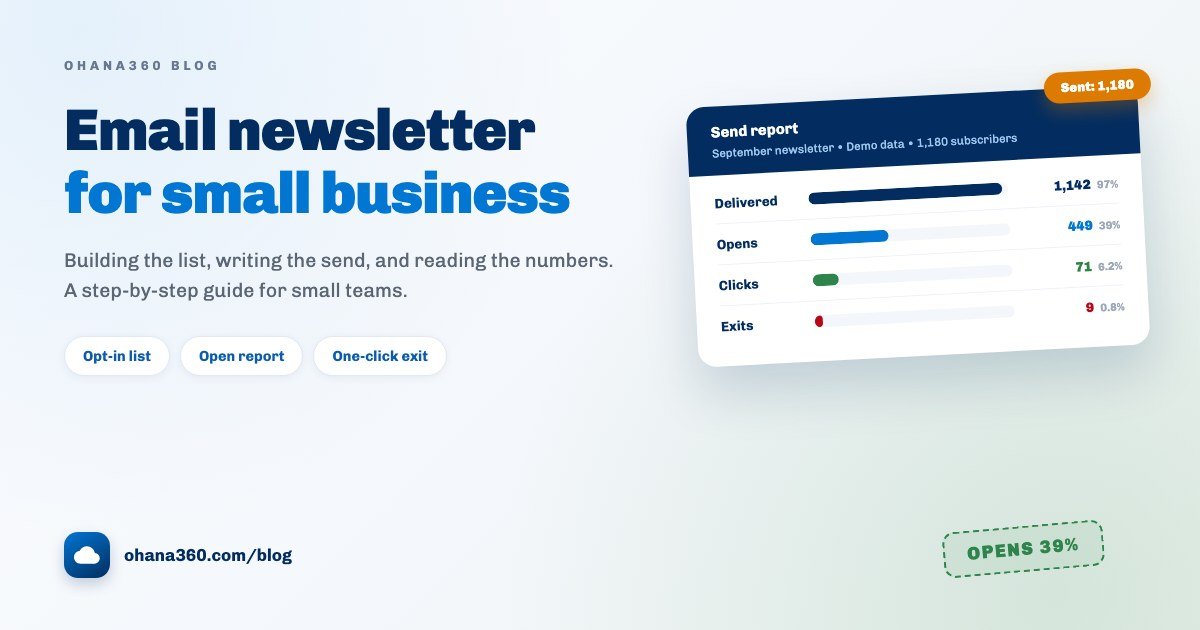
The screen everybody looks at after a send is usually read wrongly. No single number is good or bad; the ratios between them carry the meaning. Ashgrove's September send looks like this.
Each drop in the funnel points at a different problem, and therefore at a different job. Look at which step falls away, not at the total.
| Where the drop is | What it means | What to do |
|---|---|---|
| Delivery is low (38 failures) | The list has aged: closed work addresses and typos | Remove the failing addresses before the next send instead of after it |
| Opens are low | The problem is the subject line or the sender name, not the content | Shorten the subject to one promise and keep the sender name fixed |
| Opens fine, clicks low | People read it but cannot tell what to do next | Leave one button and label it with the action ("Book a service slot") |
| Clicks fine, nothing happens | The link takes the right person to the wrong page | Point the button at a page about exactly the thing the email promised |
| Unsubscribes rising | Frequency or content has drifted from what you promised | Reread the wording next to your signup form and steer back to it |
There is also a per-subscriber score: how much of what you sent that person actually opened. Addresses that never move off zero are the dead part of the list, and carrying them does more than dent your open rate, it feeds your sender reputation too. Once a year, send the non-openers one email asking whether they still want it, then remove the silent ones. That is a healthy habit, not a loss.
Staying out of spam: SPF, DKIM and DMARC in plain words
The three acronyms look technical and each does one describable thing. Together they prove to the receiving server that the message really was sent on your behalf.
| Record | What it says | Without it |
|---|---|---|
| SPF | "These servers are allowed to send mail for this domain" | The receiver cannot confirm the sender was authorised |
| DKIM | "This message was not altered in transit, and here is the signature" | Integrity cannot be proven and the trust score drops |
| DMARC | "If the first two do not line up, reject or bin it, and report back to me" | You never learn that someone is forging mail in your name |
While you send through Newsletter360 those three records belong to the sending infrastructure. The display name is your organisation name, replies come back to the organisation email you verified under Company Information, and there is nothing for you to configure in your own DNS. If you want the newsletter to leave from your own domain instead, an organisation-specific SMTP account can be set up, and that setup happens on the platform side, which means you ask for it through support. At that point the three records do become yours to add.
With the technical side settled, behaviour decides the rest, and behaviour is what filters actually judge:
- Consent. Complaint rate outranks everything. One send to people who never asked will undo the best DNS setup you can buy.
- The exit. Unsubscribing has to work in one click, with no login and no form. Making the exit hard only makes the spam button easy.
- Content. No link shorteners, no attachments, never an email that is one big image, and no capitals or exclamation marks in the subject.
- Rhythm. Regular sending to the same list is a positive signal. A sudden bulk send to a list that has been silent for months is the opposite.
Consent, in one honest section
Rules differ by country and this is not legal advice, but three obligations show up in nearly every regime, and building for them keeps you out of trouble almost everywhere.
- Permission, recorded. Send to people who asked. Keep when, where and through which form each subscriber signed up, because that record is the only thing you have if the question ever comes up.
- Identity. Say who is sending. A real business name and a postal address in the footer are a requirement in many places and a trust signal everywhere.
- A working exit. Every message carries an unsubscribe link that works immediately, in one click, without a login, and the request is honoured on the next send rather than weeks later.
Beyond those, the specifics matter: CAN-SPAM in the United States, the GDPR and ePrivacy rules in the EU and UK, and local marketing regulations elsewhere each carry their own conditions on consent, records and timing. Confirm your own position with a legal adviser rather than trusting a summary in a blog post, including ours.
Connecting the newsletter to the CRM: who gets the call?
This is the most underused part of a newsletter. It is not only a way to talk, it is a cheap interest meter: you ask 1,180 people one question and 449 of them raise a hand. The value is in what you do with the hands.
| What the subscriber did | What it tells you | Whose job, and when |
|---|---|---|
| Opened the last three | They are following you; the ground for an offer is already there | Sales calls within two days of the send |
| Opened and clicked | The interest has a subject, and it is on a specific page | Sales sends one line about the thing they clicked |
| Subscribed this week | The warmest moment; the interest exists today | A short welcome now, without waiting for the next issue |
| Score at zero | On the list but not reading it | Removed on the yearly cleaning pass |
| Unsubscribed | Closed to marketing email; the relationship is not over, the channel is | Written to the record, and never used again |
An honest boundary here: the Newsletter360 subscriber list is separate from CRM contacts, and the two do not match themselves up. If you want to see a score and then call that person, you filter the subscriber list, export it, and match on the email address against your contacts. We flag the manual step deliberately so you can design around it.
Do not leave the call itself to memory: the person to ring becomes a task with a date and an owner. The long version of building that habit is in the automated follow-up reminders guide, and the messaging side of the same idea is in managing customers on WhatsApp. When the interest turns into a number, how to write a business quote covers the next step, and what is CRM is a good starting point if the vocabulary of records and contacts is new.
How Newsletter360 works in Ohana360
Newsletter360 is an add-on, enabled from the Marketplace in one click. Here is what it does, without inflation, and what it does not do, without hiding it. This is the most important section of the guide.
- Tabs: Home, Subscribers, Newsletters. The home page carries four counters (Subscribed, Unsubscribed, new in the last 30 days, newsletters sent) and a Newsletters Needing Attention list that surfaces waiting drafts and sends still running.
- The subscriber list: a list of its own, separate from CRM Contacts. Columns: email, name, status (Subscribed / Unsubscribed), score, opens (opened / sent), last open, source and signup date. It is a full list view with filters, column selection, sorting, saved views and export.
- Row actions: Unsubscribe takes someone out of sends, Resubscribe brings them back, and New adds one by hand. Deleting removes the record permanently, so if the point is simply to stop the mail, Unsubscribe is the right action.
- The signup form: the Form Integration card on the home page shows the ready-made request with your org number and form key. Your site's server posts to that endpoint and the address lands straight in the Subscribers list. Fill in the
sourcefield and the Source column tells you which form brought what. The endpoint has bot protection: a hidden trap field and a daily attempt limit per IP. - Resubscribing: when someone who previously unsubscribed fills the form in again, that counts as fresh consent and the subscription is reactivated.
- The newsletter record: an internal name, the email subject and the HTML content. Writing
{ad}in the content substitutes the subscriber's name. Preview renders it before you save. A new newsletter starts as a Draft. - The unsubscribe link: appended to the bottom of every newsletter automatically, so you do not have to add one. If you would rather place it inside your own design, write
{unsub}and the link goes there. - Test send: asks for one address and sends a copy with [TEST] in front of the subject. Send one before every real send, not only the first.
- Sending: the Send button confirms how many subscribers it will reach, then queues every address in Subscribed status. The queue empties in the background at a pace that protects deliverability, and you can close the browser. The status path is Draft, Sending, Sent, flipping to Sent on its own when the queue empties. To prevent abuse, the number of campaigns an organization can send per day is capped.
- The report: the Statistics column on the newsletter list gives sent, opened, queued and failed counts. While a send runs, a progress bar appears beside it and the numbers refresh themselves; Refresh updates them on demand.
- Open tracking: measured with an invisible pixel in the message body, feeding each subscriber's score, open count and last open date.
- The sender: the newsletter goes out on behalf of your organization. The display name is your organization name, and if you verified your organization email under Company Information, replies come back to your address.
- Consent gate: with the consent add-on enabled, recipients who have refused email are dropped from the send queue on the server, whether or not you noticed them.
- Not included: scheduling a send for a future date, A/B testing, drip sequences and triggered series, a drag-and-drop editor and a template gallery, click tracking and per-link reporting, sending to part of a list (segments or tags), double opt-in with a confirmation email, bulk CSV import of subscribers from the interface, automatic bounce handling and list cleaning, using subscribers or newsletters in the report builder or the flow canvas, and sending from your own domain's SMTP (that one is configured on the platform side). Where you need these, you keep your existing setup.
Want to see the flow in 92 seconds?
Newsletter360 or Marketing360?
In one sentence: Marketing360 builds segments from the contacts and leads already in your CRM and sends campaigns to them, while Newsletter360 sends a regular newsletter to an opt-in subscriber list that sits outside the CRM. The first talks to customers and prospects, the second to readers who put themselves on a list. Most small businesses run both, and the distinction is worth keeping: a campaign is a one-off, a newsletter is a promise.
Getting the first one out in an afternoon
| Step | What to do | Time |
|---|---|---|
| 1 | Open Newsletter360 and read the Subscribers list: how many, and where they came from | 10 minutes |
| 2 | Wire your site's signup box to the endpoint on the Form Integration card and fill in the source field | 30 minutes |
| 3 | Pick one topic and write the subject line; keep it under 40 characters | 15 minutes |
| 4 | Write the content: preheader on the first line, then one headline, one image, one button, a footer | 45 minutes |
| 5 | Check it in Preview, send yourself a test, and open that test on a phone | 10 minutes |
| 6 | Send it, read the Statistics column that evening, and build tomorrow's call list from who opened | 15 minutes |
Keep the output of step six for the next issue: which subject line got opened, which button got clicked. After five sends you are working from your own list's data instead of somebody's benchmark. Current plans are on the pricing page, and you can request a demo to try it with your own list.
Frequently asked questions
How do I start an email newsletter for a small business?
What is a good newsletter open rate?
How often should a small business send a newsletter?
Why does my newsletter land in spam?
Do I need consent, and what about CAN-SPAM and GDPR?
Does Newsletter360 do scheduling, A/B tests or drip sequences?
Let the newsletter live on the record, not in an export
An opt-in list, signups straight from your site, one-click unsubscribe, and an open report the moment the send finishes. See who opened, and build the call list from there.