Anyone asking how to build a knowledge base usually has the same three things on the desk: a couple of people answering the phones, a handful of questions that come back every single day, and a note about "writing up the FAQs" that has survived two quarters untouched. Our example is Kestrel Hire, an eleven-person tool and plant hire business with one depot. Three people cover the counter and the phones, and the questions arrive by phone, email, WhatsApp and in person. (Demo data.)
This guide treats an internal knowledge base for a small business as an operations tool that removes repeated work, not as a writing project. In order: which question earns an article, what goes inside one, how an article moves from draft to published, how it attaches to a support case, and how you tell whether any of it is paying off.
How many times a month do you answer the same question?
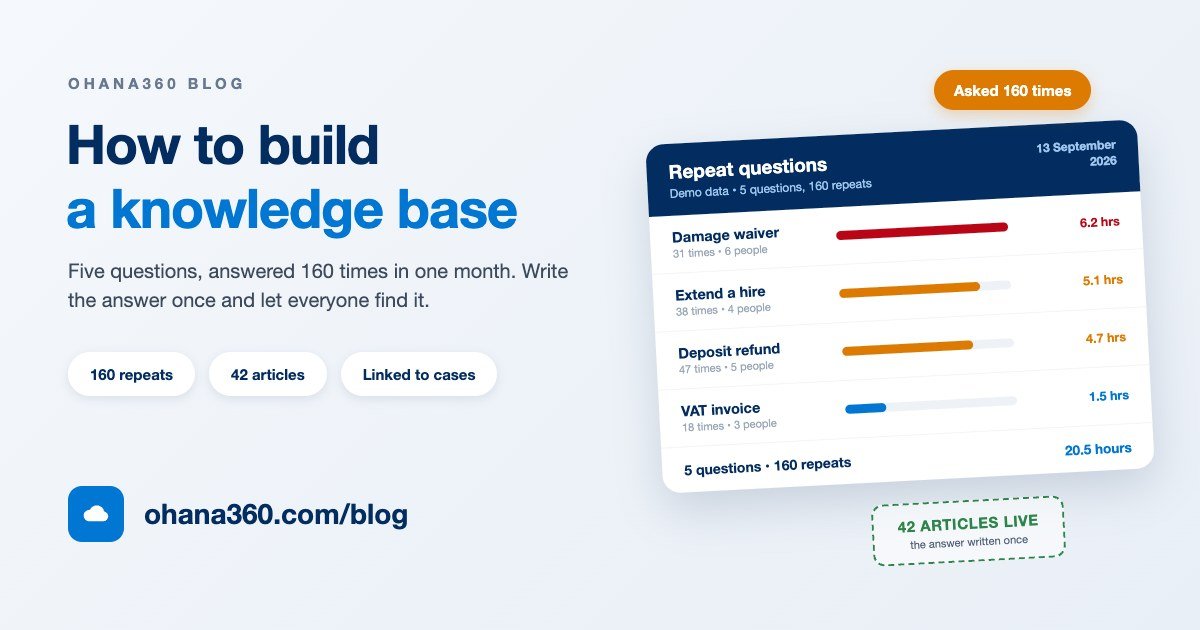
The decision to build a knowledge base is not settled by an argument, it is settled by a count. Keep a note of every question the desk answers for a month, then count the repeats. September at Kestrel Hire looked like this.
The number to read is not the total hours, it is how those hours are spread. Twenty hours sitting on one person is a capacity problem. The same twenty hours spread across six people is a consistency problem: six answers go out to customers, none of them wrong, none of them the same.
There is a hidden cost underneath as well. Whoever answers has to think it through from scratch every time, so of those seven minutes maybe three are typing and four are remembering. An article removes the four, because the remembering has been written down once.
Which questions earn an article, and what goes in one?
Not every question deserves one. A question earns an article when it passes three tests: it has been asked more than once, its answer is broadly the same each time, and that answer can be written as steps. "Where is my order" fails all three. "How do I get last month's VAT invoice" passes all three.
There are only a handful of fields on an article record, so it is worth knowing what each one is actually for.
| Field | What goes in it | The usual mistake |
|---|---|---|
| Title | The customer's own sentence, phrased as a question where possible | Writing it in internal language, like "EOD procedure" |
| Category | The one topic the article belongs to, picked from the list or typed as a new one | Creating a category per article; fifteen categories means none |
| Summary | The answer in one sentence; search and case suggestions read this field too | Leaving it blank, which makes the article weak in search |
| Content | Numbered steps, with the exception noted at the end; written as plain text | One article covering three screens, when each screen deserves its own |
| Status | Draft, Published or Archived; only published ones appear in search and suggestions | Leaving a half-written article on Published |
| Owner | The person who wrote it, which tells you whom to ask six months later | A shared login owning everything |
One formatting rule covers the content: number the steps, keep one action per step, and put the exception on the last line. Nobody on a support desk reads an article top to bottom; they scan it while the customer is still on the line, and a numbered list can be scanned in a way a paragraph cannot.
How does an article go from draft to published?
This is the part that makes a knowledge base work: accepting that an article has a life. It gets written, read, published, goes stale, gets updated, and one day genuinely stops being true. The drawing below puts that life next to the category list and an article attached to a support case.
The three states are worth spelling out, because they are what you actually decide between.
| State | Where it shows | When to use it |
|---|---|---|
| Draft | Inside the app only; never in the home search, the case panel or the portal | While it is unfinished, or waiting for a second pair of eyes |
| Published | Home search, the suggestion panel on cases, and the customer portal | When the answer is right and works today |
| Archived | Drops out of search and suggestions; the record and its history stay | When the product changed, the offer ended or the procedure died |
Editing a published article does not change its state, it only moves the updated date forward. That small detail is the simplest health check you have: an article that has not been touched for ninety days surfaces itself in the Articles Needing Attention list on the app home page. The same list pushes waiting drafts to the top, so half-finished work does not quietly disappear.
One warning: archive a dead article, do not delete it. Deleting takes the context away from every case it was attached to, while archiving pulls it out of search and leaves the history readable.
How many categories, and what should they be called?
The number of categories is the most over-thought decision in this whole exercise. Five to eight is enough for most small businesses, and you will get a better answer by naming them after the first ten articles than by designing them beforehand. A category is a search shortcut, not an archive shelf.
- Name them in customer language. "Deposits and payment" is a good category; "Financial processes" is not. The name should be the word in the head of the person looking for the article.
- Split by topic, not by verb. "Delivery and collection" is a topic. "Common tasks" is a bin, and within a quarter everything ends up in it.
- Do not open a category for one article. Fewer than three articles means the category does not exist yet; put the article next door.
- Do not wait for sub-categories. Categories in Ohana360 are a flat list, with no tree and no nesting. If you need depth, put it in the article title rather than the category name.
The category list is managed from the article itself: you pick from the list when creating an article, or type a new name and it exists from that moment. There is no separate category admin screen, so consistency is on you. Give that to one person, or in three months you will be running "Deposits", "Deposit" and "Deposits and refunds" side by side.
How does an article attach to a support case?
The knowledge base earns its keep on the case record, not on the tab that lists articles. With Service360 enabled, a Knowledge Base panel sits on the case page and does two jobs.
- It suggests. The words in the case subject are matched against the title, summary and category of every published article, and the three best matches are listed. The agent reads the answer instead of hunting for it.
- It links. The Link button next to the right article attaches it to that case. The link runs both ways: a Linked Cases list appears on the article record, so you can see which problems each answer actually solved.
That second direction is the quiet report inside a knowledge base. When twelve cases hang off one article, that article has stopped being a piece of writing and become product feedback: either the thing is confusing or the setup instructions are thin. For the same chain viewed from the case side, the complaint tracking guide covers how a complaint gets logged and closed.
The panel is a record component, so it can be moved or switched off. Under Setup > Record Page Layout, the Record Components card carries "Suggested Articles (Cases only)".
Can customers read the articles themselves?
With the Portal360 add-on, yes, but set the expectation properly. A customer you have set up as a portal user signs in with their own email and password and searches published articles from the Knowledge Base tab. That is a customer portal, not a public help centre: no login-free help site is generated, and nothing here is crawlable by search engines.
The second limit matters more. You cannot choose article by article what reaches the portal. Every article in Published status appears there, so anything meant to stay inside, discount authority or exception procedure, either belongs in a separate article or stays in Draft.
How do you know whether it is working?
The article count is not a measure of success. Forty articles nobody opens is worse than twelve that get used every day. There are four signals worth watching, and all four sit on the records.
| Signal | Where it shows | What it tells you |
|---|---|---|
| Views | A counter on the article list and in the record header | Whether the article is findable; one stuck at zero is unnecessary or badly titled |
| Helpful votes | Collected by the Helpful button on the article page | Whether readers got their answer; high views and low votes means rewrite it |
| Linked cases | The Linked Cases list on the article record | Whether this answer is genuinely used in the field |
| Last updated | A column on the list and a row in Articles Needing Attention | Anything past ninety days may already be out of date |
All four are available for reporting. Knowledge Base Articles appears as an object in the Report Builder with number, title, category, status, views and helpful votes, and a ready-made Views by Category chart shows which topic is carrying the load and which category is empty.
The real measure sits outside the knowledge base, though: is the number of cases on that topic falling? Watch a topic for two months after publishing its article. If nothing moves, the problem is not the article, it is that nobody found it, so rewrite the title in the customer's own words.
If that is still not enough signal, ask people directly: the customer satisfaction survey guide covers a one-question survey at case closure. If records, contacts and cases are new vocabulary, what is CRM is the place to start, and automated follow-up reminders covers calling back the customer the article did not rescue.
How Knowledge360 works in Ohana360
Knowledge360 is an add-on, enabled from the Marketplace in one click. Here is what it does, without inflation, and what it does not do, without hiding it.
- Tabs: Home and Articles, alongside the shared tabs: Accounts, Contacts, Tasks, Calendar, Files, Reports and Dashboards.
- The home page: a "How can we help?" search box sits at the top and shows how many published articles you have. Below it are the Today Panel, the Object Inventory and two lists: a Draft strip of articles waiting to be finished, and Articles Needing Attention, which surfaces drafts and anything older than ninety days.
- Creating an article: New on the Articles tab opens a dialog with Title, Category (from the list or typed fresh), Status, Summary and Content. On save the article takes a KB number and its record page opens.
- The article list: a full list view. Columns are number, title, category, status, views, helpful votes and last updated, with filters, column selection, sorting, saved views and export. Double-clicking a row edits the title, category, summary and content in place.
- The record page: the header carries the article number, category and status badges, the owner, the updated date and the view counter. The buttons are Helpful, Publish, Archive, Back to draft, Edit and Delete. Pressing E opens the editor.
- Record cards: Article Content, Details, Linked Cases, Related Articles from the same category, and Chatter. Their order and visibility are set under Setup > Record Page Layout.
- Search: the box on the app home page searches published articles only, while the global search and command palette at the top list articles among your other records regardless of status.
- With Service360: a Knowledge Base panel appears on the case page, suggests articles by subject and links one to the case in a click.
- With Portal360: published articles become searchable for portal users on their Knowledge Base tab.
- Setup side: the Article object appears in the Object Manager, so you can add your own fields and picklists. Validation rules apply. The object is listed in sharing settings and in the profile and permission set matrix, so you decide who can create and edit articles. In the REST API the object name is
article.
Not included: what Knowledge360 does not do
- No rich text and no images. Content is written as plain text and rendered as plain text: no bold, no tables, no screenshots, no embedded video and no formatted links. Files do not attach to an article record either; they live on their own tab.
- Search does not read the body. The in-app search, the global search and the case suggestion panel all match on title, summary and category, never on the article body. That is why the summary field should never be left blank.
- No review state and no approvals. The states are Draft, Published and Archived. Approval processes are defined only on Opportunity, Lead, Case and Account, so an article cannot be routed for sign-off.
- No version history. Editing a published article does not keep a copy of the previous text, and there is no way back to an earlier version.
- No public help centre. Articles are visible inside the app and to signed-in portal users only; no login-free, crawlable help site is generated. You also cannot pick which articles reach the portal, because every published one does.
- No automation on articles. The flow canvas and scheduled flows cannot select the article object, and assignment rules exist only for Lead and Case. A rule like "open a task when an article is ninety days old" cannot be built; Articles Needing Attention lists them, but it does not create the task.
- Bulk import is not practical. Article appears in the object list of the import wizard, but there is no ready column mapping for title, category and content, so a bulk load goes through the REST API instead.
- No sub-categories. Categories are a flat list, with no tree, no nesting and no per-category access settings.
Want to see the flow in 104 seconds?
Getting a knowledge base standing in seven days
| Day | What to do | Time |
|---|---|---|
| 1 | Open a shared list for the desk: one line for every question anyone answers | 10 minutes |
| 2 | Enable Knowledge360 from the Marketplace and show the team the Articles tab and the home search box | 20 minutes |
| 3 | Pick the five questions that repeat most and write the titles in the customer's own words | 30 minutes |
| 4 | Write the five articles: a one-sentence summary, numbered steps, the exception at the end. Leave them as drafts | 90 minutes |
| 5 | Have a second person read the drafts, fix them and press Publish | 40 minutes |
| 6 | Switch on Suggested Articles under Setup > Record Page Layout and try it on a live case | 20 minutes |
| 7 | Announce the rule: the second time a question arrives, its article gets written. Build the views report | 30 minutes |
From week two there is only one habit to hold: two new articles and one update every week. That rhythm produces about forty genuinely used articles in six months. Current plans are on the pricing page, and you can request a demo to try it with your own questions.
Frequently asked questions
How do you build a knowledge base from scratch?
What is the difference between an internal knowledge base and a public FAQ page?
How many articles should a small business start with?
Is a knowledge base better than a shared folder of documents?
Who should write the articles, and who should review them?
Does Knowledge360 support rich text, images, versioning or an approval workflow?
Can customers read the articles themselves?
Write the same answer for the last time
A repeated question becomes an article, the article turns up beside the case, and the person with the answer does the work instead of the searching. Then read from the records which article is carrying the load.