Managing Instagram DMs in a CRM means bringing the messages sent to your business account into one inbox the whole team can see, giving every conversation an owner and linking it to a customer record. In Ohana360 the Instagram360 add-on does this: DMs, story replies and story mentions land in the inbox, replies go out from Ohana, and Instagram's 24-hour rule is counted on screen.
Ohana360 is a business cloud that keeps sales, service and commerce records in one database; Instagram360 is one of its Marketplace add-ons. Instead of a definition, this article reads a handover note. Mavi Atölye is a fictional online shop in Izmir selling handmade silver jewelry. At 6 pm, Ece Aydın from the morning shift hands the inbox to Mert Kılıç on the evening shift. Usernames and numbers are examples; screen names, rules and limits are taken from the Ohana360 code.
What does managing Instagram DMs in a CRM mean?
Managing Instagram DMs in a CRM means the messages live on the team's shared screen rather than in an app on one phone: it is clear who is answering, a conversation does not get lost when the shift changes, and when the customer orders, the chat is linked to the order. When a phone changes hands, three things get lost: who is handling which conversation, which question is still unanswered, and which customer the writer actually is.
In Ohana360 the inbox opens from two places: Instagram360 > Inbox and, when the account is connected, the Instagram DM tab in Influencer360. Both are the same inbox; a conversation is not stored twice. For WhatsApp messages, WhatsApp360 uses the same layout in its own inbox.
How do you connect an Instagram account to a CRM?
An Instagram account is connected to Ohana360 when an organization admin presses "Connect Instagram" in App Settings on the Instagram360 home page, logs in to Instagram and grants permission. Mavi Atölye did this once:
- Check the account type. The account must be professional: a business or creator account.
- Allow message access. In the Instagram app, Settings > Messages and story replies > Message requests > Connected tools > "Allow access to messages" must be on.
- Connect. The admin presses the button and grants permission in the window that opens. Other users do not see the button; they see "The connection is set up by the organization admin."
- Wait for the first sync. Once connected, the last 50 conversations and the last 20 messages of each are pulled in. These older messages are not counted as unread and do not trigger notifications.
When the connection is made, Ohana360 adds three things by itself: an Instagram field on the Contact object, an automation entry named "Instagram DM senkronu" (Instagram DM sync) under Setup > Automations and an "Instagram Messaging API" entry under Integrations. Messages arrive instantly by webhook; if the webhook misses an event, the server polls the latest conversations every 3 minutes. Instagram's access token is valid for about 60 days and renews itself 10 days before it expires; if it still expires, the person who connected the account gets a warning once a day. One Instagram account is connected per organization.
What does the inbox show at a shift handover?
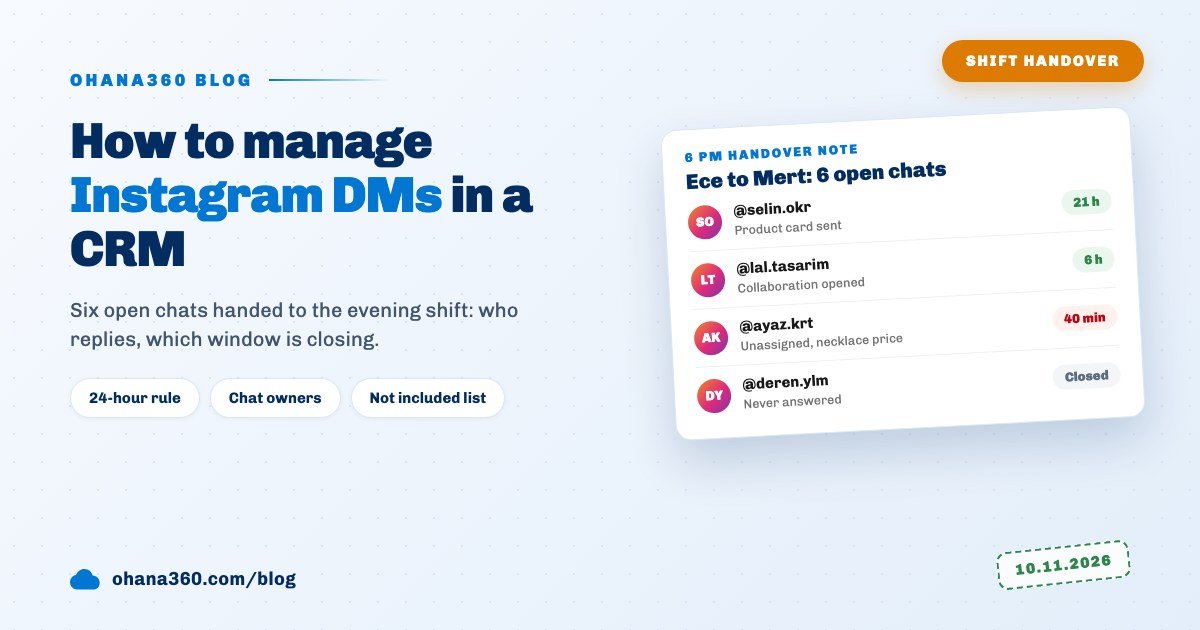
At a shift handover, the inbox shows in one list who owns each open conversation, which ones are unread and which reply windows are about to close. Ece's 6 pm handover note had six lines:
| # | Conversation | Owner | Status | Window | Note to Mert |
|---|---|---|---|---|---|
| 1 | @selin.okr | Ece Aydın | Moon series ring, size 14; product card sent | 21 h | If she asks to pay, Payment link |
| 2 | @burak.dmr | Ece Aydın | Shipping question; chat linked to the order | 19 h | Tracking number sent, can be closed |
| 3 | @lal.tasarim | Mert Kılıç | Collaboration offer; collaboration opened | 6 h | Waiting for her fee |
| 4 | @nehir.ciz | Unassigned | Mentioned us in her story | 23 h | A thank-you message |
| 5 | @ayaz.krt | Unassigned | Asked a necklace price at 6:40 pm yesterday | 40 min | Do this first |
| 6 | @deren.ylm | Ece Aydın | Wrote two days ago, never answered | Closed | Only if he writes again |
Mert started with line five: that conversation's window was closing in 40 minutes. This is what the inbox looked like at that moment:
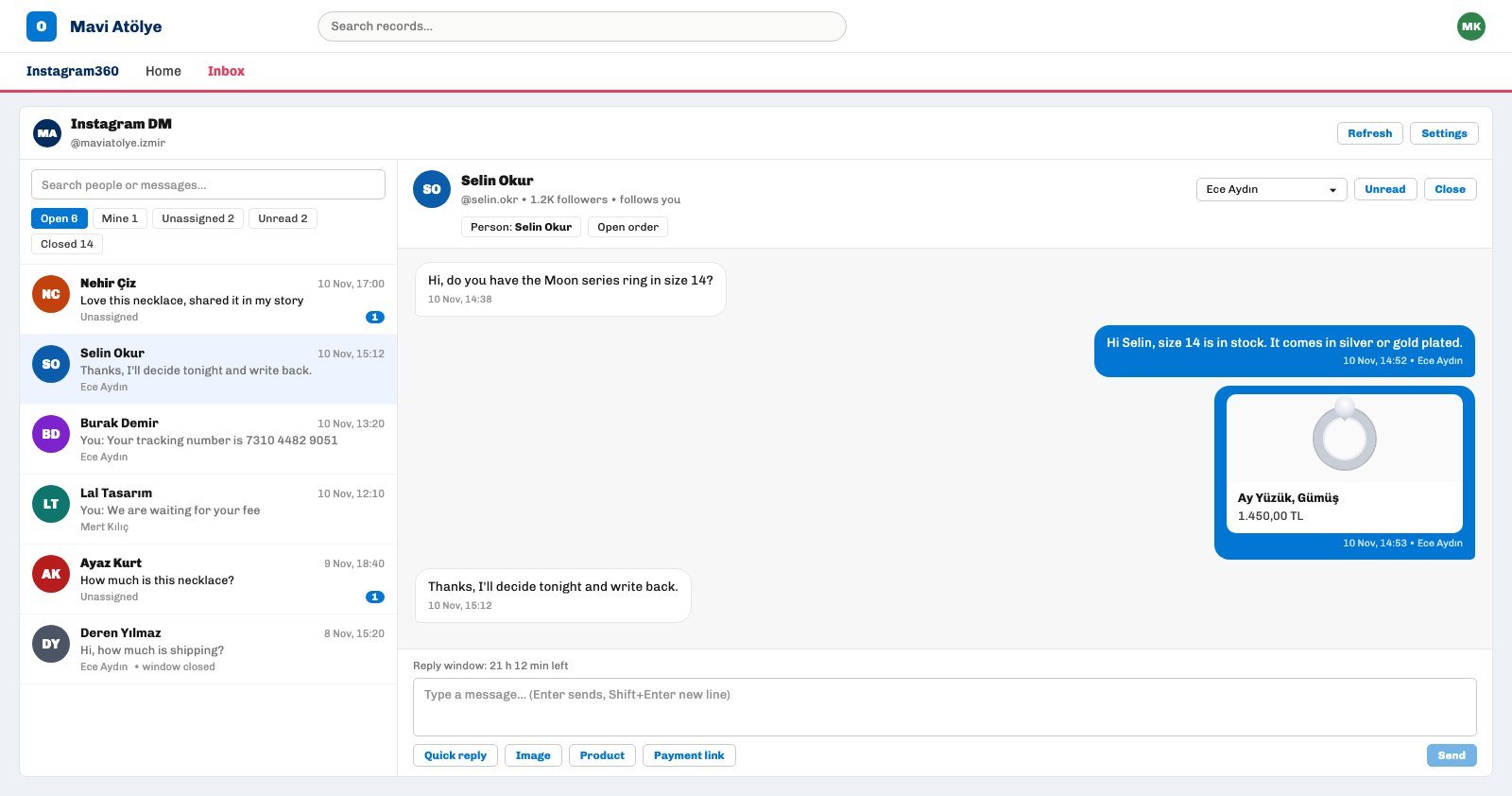
- Boxes. Open, Mine, Unassigned, Unread and Closed, each with a count. The search box looks in the username, the name and the text of the last message.
- List row. Name, time, last message (prefixed "You:" if we sent it), the owner or Unassigned, "window closed" if the window has closed, and an unread badge.
- Chat header. The conversation owner picker, the Unread and Close buttons, and the other person's follower count and whether they follow you. A message from someone who does not follow you may be waiting in Instagram's message requests; the header says so.
Who on the team gets an Instagram conversation?
An Instagram conversation goes to the person picked as its owner; when a conversation has no owner, the first user to reply from Ohana automatically becomes its owner. The moment Mert replied to @ayaz.krt, the conversation left the Unassigned box and moved to Mert's Mine box.
- Notifications. When a new message arrives, the owner gets a bell and a mobile push; if there is no owner, the organization's admins do. One conversation sends at most one notification every 10 minutes, so a customer writing several lines in a row does not keep the phone ringing.
- Handover. The owner is changed with the picker in the chat header. Before leaving, Ece gave her three open conversations to Mert, so the evening's new message notifications went to him.
- Unread and Close. Unread marks the conversation as unread again and returns to the list. Close moves it to the Closed box; if the customer writes again, the conversation reopens by itself. Mert closed line two.
There is no mechanism that hands out conversations in turn or by rule; Ohana360's assignment rules are for leads and cases. On the Instagram side, assignment happens by hand or by the first reply.
What is Instagram's 24-hour rule?
Instagram's 24-hour rule means a business can reply to a person only within 24 hours of that person's last message, and it cannot send a first message through business tools to someone who never wrote to it. This is Meta's rule; Ohana360 does not change it, it only makes it visible:
- Counter. A line such as "Reply window: 21 h 12 min left" sits above the composer; in the last hour it turns red and adds "reply before it closes".
- Warning. If the last message came from the customer and the conversation is not Closed, the owner gets a notification that the reply window is closing, one hour before it closes. Line five reached Mert's screen through this notification.
- After it closes. The composer disappears; a line explaining that the window has closed and an "Open in Instagram" button take its place. For @deren.ylm on line six, the only option was waiting for him to write again; when he does, the window opens for another 24 hours.
What can you send to Instagram from Ohana?
From Ohana360 you can send text, images, product cards and payment links to an Instagram conversation; quick replies insert frequently used text into the composer with one click.
- Text. Up to 1,000 characters. Enter sends, Shift+Enter starts a new line.
- Images. JPG, PNG, GIF or WEBP, up to 8 MB. Instagram does not accept WEBP, so those files are converted to JPG before sending.
- Product cards. With Commerce360 on, you pick from active products; the card shows the product name, price, image and "Tükendi" (sold out) when stock has run out. If a store product URL is entered in the settings, the card gets a "Ürünü incele" (view product) button. The card Ece sent to @selin.okr read "Ay Yüzük, Gümüş, 1.450,00 TL".
- Payment links. If a payment provider is set up in Commerce360, you enter an amount and a description; a new order is opened for the chat and the link is posted into it. The order side is covered in the order management guide.
- Quick replies. An admin defines them as a name and a text, for example "Shipping time" and "Ring size chart". The text chosen from the Quick reply list in the composer is inserted into the box and can be edited before sending.
Part of the conversation may still happen on a phone: a reply sent from the Instagram app lands in the conversation in the inbox, with the Instagram app shown as its sender. Replies sent from Ohana show the sender's name underneath.
How do you link a DM conversation to a customer record?
A DM conversation links itself to a contact on the first message if the username matches the Instagram field on that contact; if nothing matches, one click on a button in the chat header links it. The flow:
- Automatic match. Letter case and a leading @ do not matter. If Influencer360 has an open collaboration whose influencer field holds the same username, the conversation is linked to that collaboration too. The match runs once, when the conversation is first created.
- Save as contact and Link to contact. The first creates a contact from the Instagram profile name, writes the username into the Instagram field and links it to the chat. The second searches for an existing contact and fills its Instagram field if it is empty.
- Open order. With Commerce360 on, an order with status New, payment status Waiting and channel Instagram is opened and linked to the chat.
- Open collaboration. With Influencer360 on, a collaboration in the first stage with platform Instagram is opened. The offer from @lal.tasarim on line three was recorded this way; the rest of that process is in the influencer collaboration guide.
An Instagram DM card appears on the linked Contact, Order or Collaboration page, and the conversation can be read and answered from there too. Replies sent from Ohana show on the linked record's timeline as one completed task a day: subject "Instagram DM: @username", type Instagram. The full picture of activity logging is in the call and meeting logging guide, the WhatsApp version of the same idea in managing customers on WhatsApp, and the add-on summary on the Instagram360 page.
Not included: what Instagram360 does not do
- No first message, nothing after 24 hours. You cannot message someone who never wrote to you, and no reply goes out once the window closes. This is Meta's rule; Ohana360 does not get around it.
- No automatic replies. There is no chatbot, no out-of-hours auto message and no AI-written reply; a person sends every reply.
- No bulk messages. You cannot send one message or announcement to several conversations at once.
- No automatic routing. Conversations are not handed out in turn or by rule; assignment happens by hand or by the first reply.
- No per-conversation permissions. Every user with access to Instagram360 sees and can answer every conversation; you cannot restrict a conversation to its owner.
- Incoming messages are not written to records. Only replies sent from Ohana land on the timeline; a reply sent from the Instagram app shows in the inbox but leaves no trace on the record.
- No DM metrics. First response time, reply rate and conversations per rep are not measured; the home page only has the Account, Open conversations, Unread and Unassigned counters.
- Comments are elsewhere. Post comments do not land in this inbox; they are in the list of a separate add-on, Comment360.
- No voice, video or file sending. Incoming voice messages and videos can be viewed; from Ohana only text, images, product cards and payment links go out.
- No late matching. If a contact's Instagram handle is added later, the old conversation does not link itself; pick Link to contact in the chat header.
- One account. One Instagram account connects to an organization; several shop accounts cannot be managed in one inbox.
How do you set up your own shift handover?
- Write Instagram handles on contacts. Fill the Instagram column when importing so new DMs link to the right person on the first message. Importing is covered in the CRM migration guide.
- Write five quick replies. Turn the five most common questions (shipping time, size, returns, payment, stock) into quick replies.
- Empty the Unassigned box. At the end of a shift, leave no conversation in Unassigned; every conversation gets an owner.
- Sort by window. Give the handover note a window column, and let the evening shift start with the shortest window.
- Make closing a habit. Close a finished conversation; if the customer writes again it reopens by itself, and the Open box shows only what is really waiting.